Posts

Showing posts with the label 3D

3D Heads

Image
  Oh god... please kill me. Hm... much better but hardly perfect. Hmm... As you can see, I've been trying to make low poly heads in my art style... for better or worse. This is cringe. I am aware.

Market Stall and Flat Objects

Image
This is an incomplete market stall.      So why flat objects in the market stall boxes? I don't know. I am unsure if I like it. But for now, I think its approprate. I will have to see how it looks like in an enviroment space. Rendered in Unreal this time. Still a little weird, but you get the idea.      I think this really invokes some interesting low-poly vibes. Its like... high-fi N64 graphics. I'm sort of down for it really. We'll see where it takes me. One of the tilesets as you can see, shown off by Chaska the Magic Dog.

Rounding the Barrel.

Image
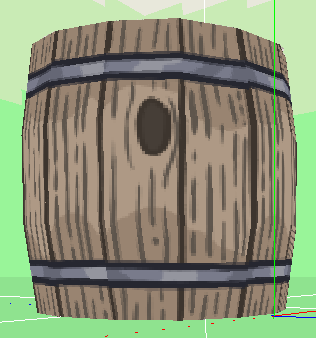
  I have rounded the Barrel. It looks much better than it being just a cylinder.

Making Objects in Crocotile

Image
  The classic box. A bucket! I love LAMP!     Obviously...  I'm currently working on objects.

Lighting Issues

Image
  Light going under the flat surface.     Look at this. It's another problem. Or is it? Seems like based off my research, Unreal is going to do this. Its just too thin! And unfortunetly that's just the way it is. See how the lighting has no problem when it has a "thickness"?     I imagine this could be a problem in a future if it isn't solved, especially if lighting comes from inside a source. We'll just have to see.

I Forgo Normal Mapping

Image
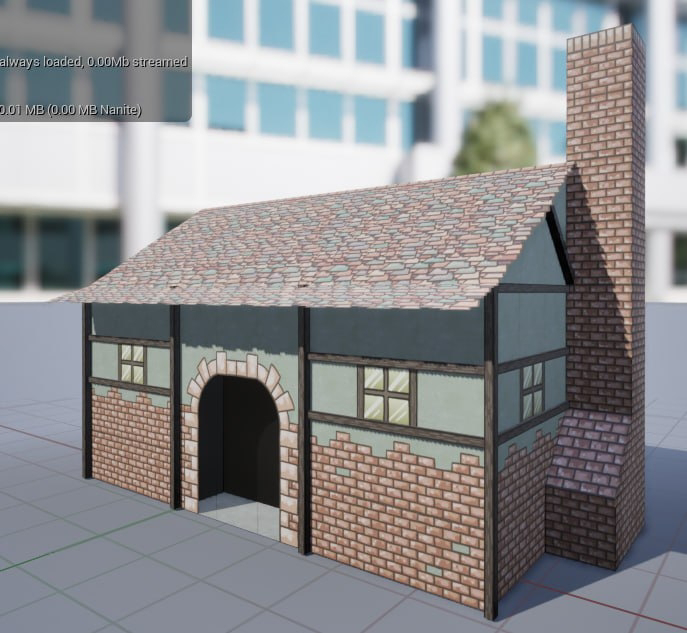
This little house is simply a proof of concept.      I can see my errors. I have tile flipping on the chimney. I also notice the planks sticking out of the roof. This is fixable, I just need to remind myself to be vigilant. I want to redo the windows so they will be reflective without the cheesey self drawn reflection.      So what did I do? I went ahead and made the wood parts 3D myself. I think I want to do the same to the doorway as well.

Clueless on Texturing

Image
Turns out I don't know anything about texturing in the slightest. This house looks realitively normal. Then I ruined it.

Making more Models

Image
  Making furnishing for inside of a islander's home.     A very simple update, but, I had begun making objects for the island homes. Can't wait to see how they look in Unreal.

Learning Shaders (Part 2)

Image
The glorious tree!     One of the biggest things I didn't understand, was that graphical images aren't double sided unless you intend them to be. I realize now, that's a "cost" saving measure. If you aren't familiar with game development/programing lingo, "cost" is basically  equivalent "resources" in the sense that computers only have a certain amount of resources they can allocate to any given game scene. If a side isn't visable, then there is no reason to draw it. This tree in the picture isn't perfect, but I plan on fixing later when I get the chance, since the trunk shouldn't be double sided (you can't and shouldn't see inside the trunk.). However, the leaves need to be double sided, so they are. As soon as I figure out how to animate this tree with wind effects, I will create an extremely large area filled with them, so I can watch for slow down. In theory, Unity does a good job with this anyways, since Unity's...

Learning Shaders (Part 1)

Image
     I don't know anything about shaders, and honestly, it looks confusing as all hell. But in theory, I will only need to learn how to use it once, as most of the design choices in the game will only require one shader shared universally. Let me show you what the tree looks like after making some selections. This is what the tree looks like using the Legacy Transparent Cutout shader. Looks like plastic. Shiny. Here is the Partical Surface shader, but the problem, with this (and you might not see it here), is that the draw order is wrong, causing massive clipping and clip through. It shouldn't look like that. Here is the basic "cutout" shader. It doesn't provide any "shade" at all. On one hand, its nice to actually see it without any shadow effects, as this is the "intended" look based off the sprite sheet. But I would like some basic shading. In fact, if I could get some basic cell shading, that would be wonderful, but I want to at least see m...

How to Make a Palm Tree (Part 2)

Image
       Back with another talk about the trees I am working on. Adding more leaves requires me to shape the leaves above the "pile" as to ensure I don't mess up the other leaves. As you can see, I've added more leaves. A single leaf is above the "pile" being shapped. Trying to fill it out nicely. Do we think it has a nice head of hair? Lets try one more well-placed leaf...     The last step is the hardest in a way... I have to give it the one-over, and see what it's missing. For starters, I do actually think it's missing the trunk roots. You can see, actual palm trees got this cool thing going on... Splits open, and has visable roots. Look at this! It's looking about right! Now I must scour the tree and see how much I really like it.      Well, that's it. Thanks for reading. Oh, I guess I forgot to mention, All of the tiles for crocotile were made by me, I drew a bunch of leaves and the textures. I might explain 3D textures and my technique i...

How to Make a Palm Tree (Part 1)

Image
In this terrible guide, I will be showing you how I made the palm tree.      First we start off with a simple stalk. This is done using my tileset, and some finagling. Basically this is a weirdly attached octogonal prism that is broken up into skinner prisms to give the "tiered" effect. Notice that it isn't perfect, that is intentional. Plants are allowed to be a little weird, that's what gives it character. Nice Straight Stem.      Second off, we got to bend the stalk to our will. Nothing too crazy on our first tree, we can get some crazier bends on other trees, but for now, lets keep it simple. Firm with a little give.      Third, we start the leaf process with a simple layer of base leaves. Small leaves inside to give the illusion of some depth, I will likely go back and add a few more "under layer" leaves just to fill the center out. 4 inside leaves for thicc-ness.      To me, this looks like a good under base spread. I wil...

Working with 3D plants

Image
    Been modeling some low-poly 3D plants. The program being used is Crocotile, and it doesn't do transparancy well except in the case of full transparancy. This is why you see the artifacts on the edges of the leaves. This is fine, as Unity renders it a lot better and makes it smooth. So far, all I have been doing is experimentation.

3D modeling?

Image
     As you can see, I have been working on some low-poly 3D modeling. The pictures shown are of a tileset that I drew, and put into a 3D modeling program called "Crocotile 3D"      My review of Crocotile real quick. YOU WILL HATE THE PROGRAM , until you go into the options and fix some settings. There are a lot of unintuitive things about the program that the options will remedy, but because the program itself doesn't have those features turned on standard, I think its a very bad first move and will turn people away from the program itself. But over all, its intuitive enough for what I need, so I am going to use it. And so far... I am liking it!      If I get brave enough in the future, we will consider going to blender and seeing what's up. Consider this post my first real Dev Update.